
Checkout options — who pays the fees, names and questions
Choose in MJX Events whether buyers pay the gateway charges and MJX fee, how they see it, and ask names or questions at checkout.
The Checkout section of Setup decides what a buyer pays and what they are asked when they book online. In MJX Events every option is listed, with a line explaining why if it can't be used on this event.
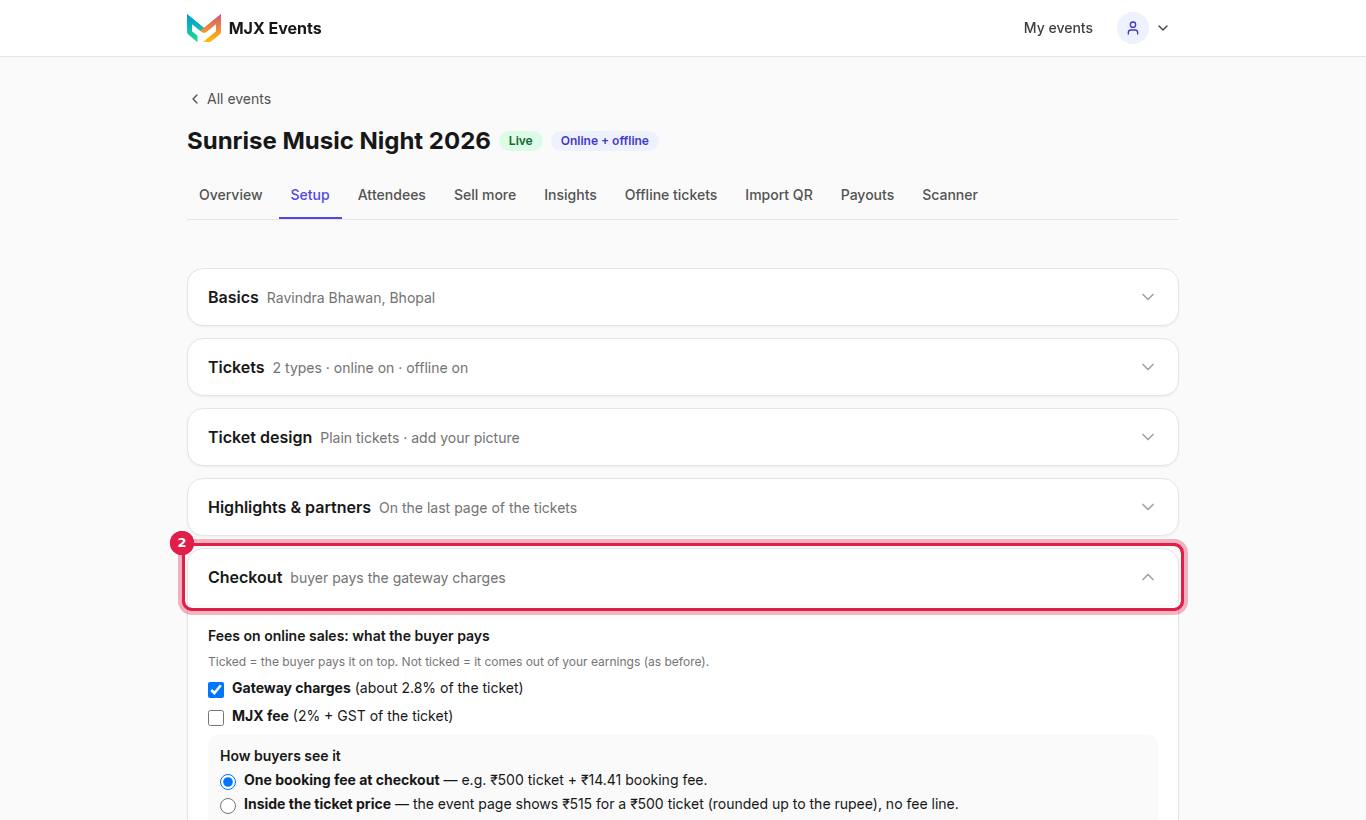
#Fees on online sales: what the buyer pays
"Ticked = the buyer pays it on top. Not ticked = it comes out of your earnings (as before)."
| Tick | What the buyer pays on top |
|---|---|
| Gateway charges | The payment gateway's fee and its GST, plus the transfer to your bank |
| MJX fee | Your plan's MJX fee plus 18% GST |
The buyer pays one booking fee that covers what you ticked, so you keep the ticket price. The MJX fee itself is always worked out on the ticket money only.
#How buyers see it
| Choice | Event page shows |
|---|---|
| One booking fee at checkout | Ticket prices as set, and "A small booking fee is added at checkout." |
| Inside the ticket price | Each ticket with the fee in it, rounded up to the whole rupee (₹425, not ₹424.74). "Prices include the booking fee." |
When a charge is 0%, its tick is replaced by "…: 0% right now, so there is nothing to pass on."
#Why the ticks may not show
- "This event has no paid ticket type yet…" — give a ticket type a price first.
- "This event sells offline only (Tickets, above), so there are no online fees to choose."
- "Online booking is switched off for your account, so there are no online fees to choose."
#Buyers can pass a ticket on (Pro)
On, a buyer can give a ticket "to a friend before the event (once per ticket). The friend gets a new QR; the old one stops working." See My tickets for the buyer's side.
#Ask the name of each person (Pro)
When someone books more than one ticket, checkout asks one name per person, and each QR then carries its own name.
#Questions at checkout (Pro)
Ask up to 10 questions, such as T-shirt size, college or food choice.
- Under Questions at checkout, type the Question (e.g. "T-shirt size, College name").
- Choose the Answer type: Short answer or Choice. For a choice, fill in Options, "separated by commas: S, M, L, XL".
- Tick Required if every buyer must answer.
- Tap Add question.
Answers show in Attendees and as one column each in the CSV export.
#Questions people ask
If the buyer pays the fees, do I get the full ticket price?
Yes. The booking fee is worked out so that, after the gateway charges (and the MJX fee, if ticked), you keep the ticket price.
Can I hide the fee inside the price?
Yes. Choose Inside the ticket price. The event page shows each ticket with the fee in it, rounded up to the whole rupee, and no fee line.
Why do I see "Pro" next to Questions at checkout?
Names per person, questions and ticket passing are Pro tools by default. The row links to your Plan page.