
Invitation tickets — guests request, you approve
Make a ticket type invitation only on MJX Events. Guests request it from your event page or your own form, you approve, and the ticket goes on WhatsApp and email. Free or paid.
Make a ticket type Invitation only and guests can no longer book it. They tap Request on it, you approve under Requests, and MJX sends the ticket with its QR on WhatsApp and email, in your ticket design. The gate, check-in and Attendees work as for any ticket.
#1. Make a ticket invitation only
- Switch on Invitation only on the type. Book online greys out: it is never in the cart.
- One request is one ticket. The type says how many people it admits (a couple pass admits 2), and each person gets their own QR.
- A type that has already sold tickets stays bookable. Add a new type for invitations.
- An event can have several invitation tickets (Guest pass, VIP couple…) next to normal ones.
#2. Where guests request it
- Your event page — invitation tickets show under By invitation, each with a Request button: name, mobile, email and address (optional). A mobile or an email is enough.
- MJX's request page — switch on MJX request page in Setup › Guest approvals and share its link, a page with only the request.
- Your own form — Setup › Guest approvals shows the event's request link (
https://event.mjxtechnologies.com/in/rq_…). Paste it into your form. It can only create requests, never tickets, so it is safe inside a public form.
MJX reads the usual fields from your form: name, phone (or mobile / WhatsApp), email, address, and ticket (the name of one of your invitation tickets). Without a ticket question, the request gets the ticket chosen in Setup › Guest approvals (Your form gives). Other answers (department, "guest of") are kept with the request.
#A form on your website
The hidden redirect brings the guest back to your own thank-you page (leave it out for MJX's).
<form action="https://event.mjxtechnologies.com/in/rq_YOURLINK" method="post">
  <input name="name" placeholder="Your name" required>
  <input name="phone" placeholder="Mobile (WhatsApp)">
  <input name="email" placeholder="Email">
  <input name="address" placeholder="Address (optional)">
  <select name="ticket"><option>Guest pass</option><option>VIP couple</option></select>
  <input type="hidden" name="redirect" value="https://yoursite.com/thanks">
  <button>Request a pass</button>
</form>#Typeform, Tally, Jotform, WordPress forms
- Open the form's Integrations or Webhooks (WordPress: Contact Form 7, WPForms, Gravity Forms and Elementor have a webhook option, some with a free add-on).
- Add a webhook and paste the request link.
- Send one entry yourself: it appears under your event's Requests.
#Google Forms
Google Forms has no webhook box. In the form: ⋮ › Apps Script, paste this, put your link in, Save, then Triggers › Add trigger › onSubmit › From form › On form submit, and allow it once.
function onSubmit(e) {
  UrlFetchApp.fetch("https://event.mjxtechnologies.com/in/rq_YOURLINK", {
    method: "post",
    contentType: "application/json",
    payload: JSON.stringify(e.namedValues)
  });
}#3. Approve
- Waiting: approve one, or tick several and approve together. Each new request rings your phone in the app.
- Each row shows the ticket asked for, its price, and Already has a ticket when the same mobile or email already has one.
- Approve every request automatically (Setup › Guest approvals) sends each ticket at once, like an open RSVP.
- A declined guest is told by email and WhatsApp.
- Publish the event first: tickets are sent only for a live event. Requests wait meanwhile.
#Paid invitation tickets
An invitation ticket can have a price when MJX has switched paid invitations on for you. Choose when the guest pays:
| Choice | What happens |
|---|---|
| After you approve (default) | The guest gets a payment link on WhatsApp and email and the ticket when they pay. Their place is held until the link runs out (Requests › To pay); then it is free again. |
| With the request | The guest pays in the normal checkout when they tap Request. You approve as usual and the ticket is sent. If you decline, they are refunded in full and the gateway's charge on that payment comes out of your next payout. |
Already paid you? On a paid request, Approve · paid to you sends the ticket at once without a pay link — for a guest who paid you in cash, by UPI or through your own form. It is recorded at the ticket's price as paid to you outside MJX (Insights shows it apart; it is not in payouts), and MJX's free-ticket fee applies to it from your credits.
Paid invitation tickets are paid out like any online sale once approved. Requests from your own form can't take a payment there, so with With the request the guest is sent to a payment page (and gets the link) to complete it.
#Running it from your own system
A company with its own HR portal, CRM or registration system can do all of this from there — create tickets, approve, send — while MJX sends the tickets and runs the gate. Check-ins come back to that system automatically.
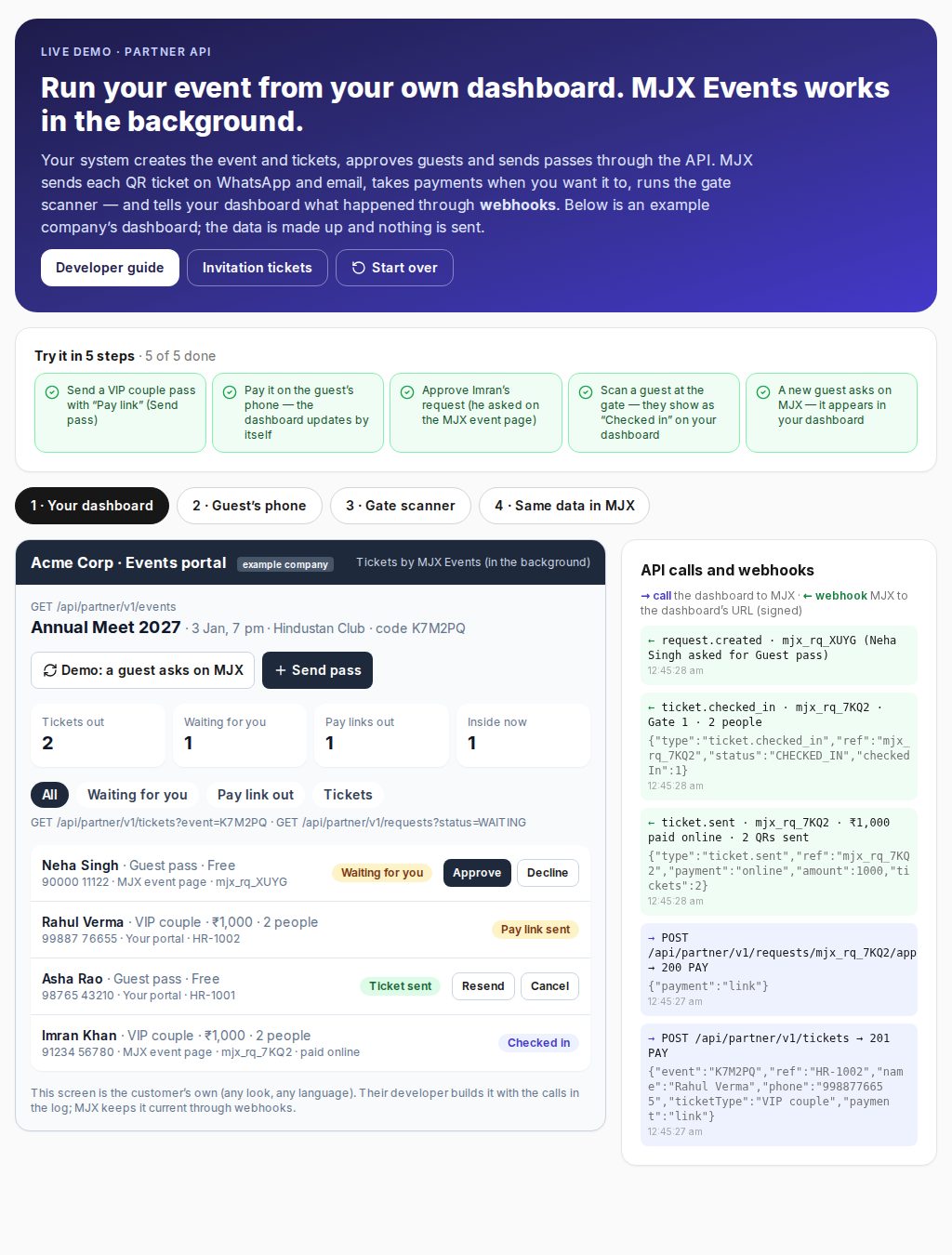
See the live demo and the Partner API guide.
#People
Everyone with a ticket for your events, one row per person (matched by mobile, else email): online buyers, approved guests, counter and printed sales with a mobile, tickets passed on. Tap an event card to see only that event's people. Search, and download a CSV (each download is recorded).
#Related
- Ticket types and prices
- Checkout options
- Partner API — when a company's own system approves the guests
- Live demo — how it looks when your own dashboard runs it through the API
#Questions people ask
Who can use invitation tickets?
MJX switches them on for your account (an add-on). Ask MJX support. Paid invitation tickets are a separate switch.
Can a guest ask for several people?
One request is one ticket. The ticket type says how many people it admits, so make a "Couple pass" that admits 2 or a "Family pass" that admits 4.
What happens when I decline a paid request?
If the guest already paid (pay with the request), they are refunded in full. The payment gateway's charge on that payment comes out of your next payout.
Can my own Google Form or website form send requests?
Yes. Paste the event's request link into your form (a webhook, a plain HTML form, or a short Google Forms script). It can only create requests, never tickets.