
Event photos, videos and past event albums
Add photos and short videos to your MJX Events event page, paste YouTube or Google Drive links, and show albums of your past events to buyers.
Photos help buyers decide. In MJX Events you can add a gallery to each event, and albums of your earlier events that show on all your event pages.
#Event photos and videos
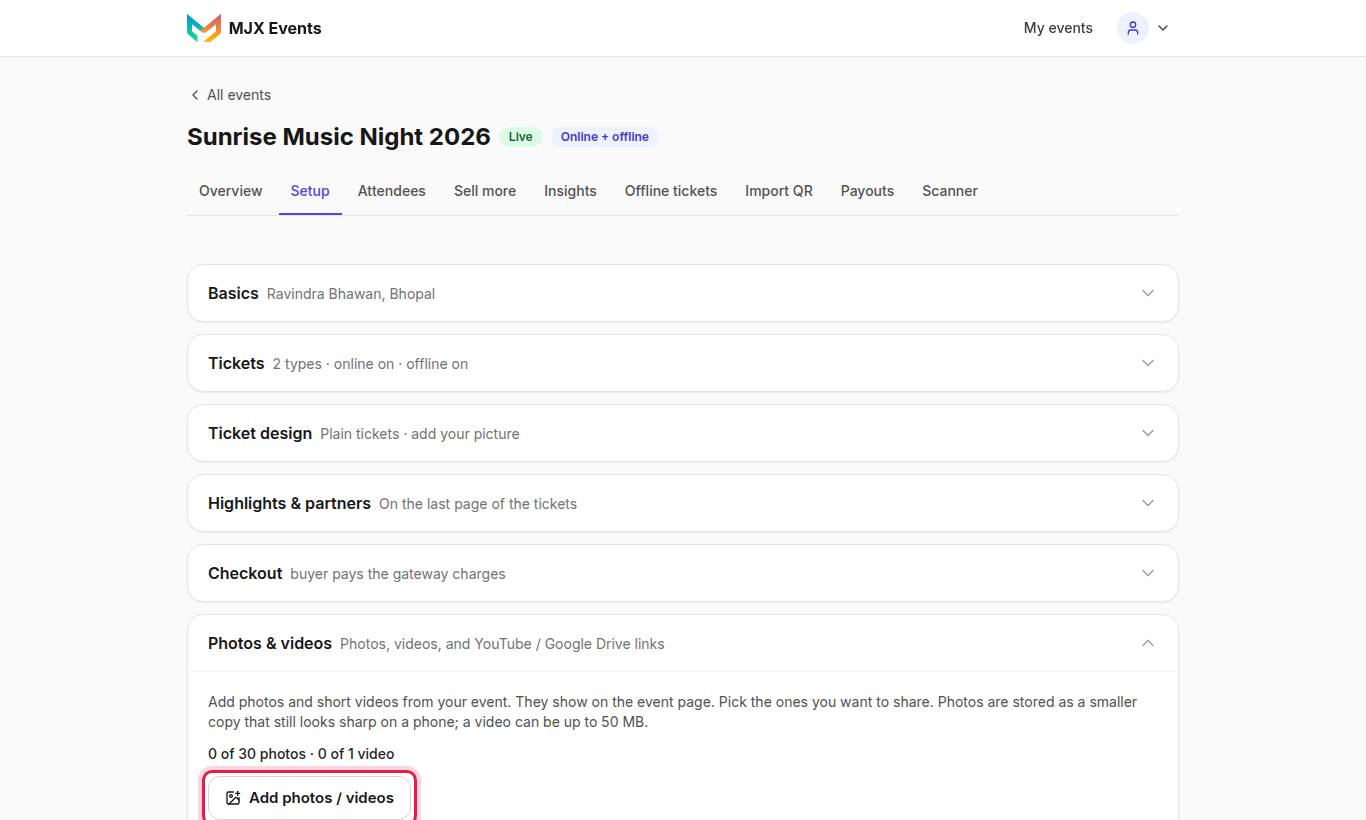
"Add photos and short videos from your event. They show on the event page."
#How to add photos or videos
- Open Photos & videos in Setup and tap Add photos / videos.
- Pick photos or a video from your device. Or, under Your photos, tap photos you already uploaded to your other events — "nothing is uploaded again".
- To add a video by link, paste it under Or paste a video link (YouTube, Google Drive or Vimeo link).
| Item | Limit |
|---|---|
| Photo | Up to 5 MB each; stored as a smaller copy that still looks sharp on a phone |
| Uploaded video | Up to 50 MB (MP4, MOV, WebM) |
| Photos / videos per event | Set by MJX (by default 30 photos, 2 videos) |
| Pasted links | Up to 20 per event; not counted in the limits |
A pasted video "plays right here on your event page; buyers are never sent to YouTube, and nothing is copied." For Google Drive, share the video as Anyone with the link, then copy its link.
#Let ticket holders add photos too
Tick Let ticket holders add photos too to allow uploads "from the app, after the event. Off means only you can add them."
#Messages you may see
- "An event can have up to 30 photos. Remove some first."
- "Videos cannot be uploaded right now. Paste a YouTube or Google Drive link of the video instead."
- "Instagram links are not shown here. Add the photo or video itself with Add photos / videos, or paste its YouTube link."
#Past event photos
Albums of your earlier events show to buyers as Past events by [you] on every one of your event pages (3 albums, 6 photos each, See all) and in full on your organizer page. This is on Plus and Pro by default.
#How to add an album
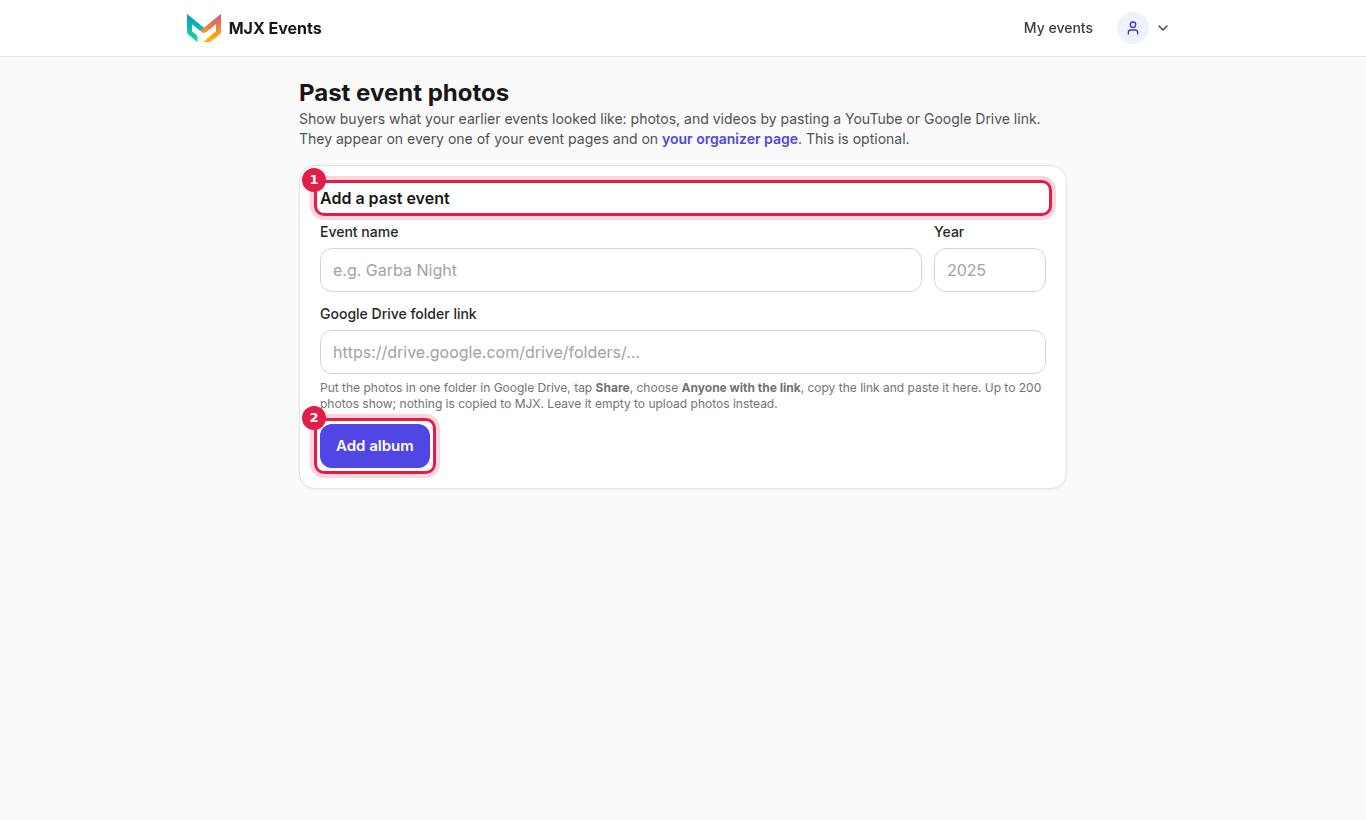
- Open Past event photos and tap Add a past event.
- Fill in Event name (e.g. "Garba Night") and Year.
- Either paste a Google Drive folder link — "Put the photos in one folder in Google Drive, tap Share, choose Anyone with the link" — or leave it empty to upload photos instead.
- Save. "Album added. Its Google Drive photos now show on your event pages."
- You can also paste a YouTube, Google Drive video or Vimeo link into an album.
| Rule | Detail |
|---|---|
| Drive folder | Must be a folder, shared "Anyone with the link", with photos directly inside (sub-folders are not read) |
| Uploads | JPG / PNG / WebP, stored smaller; a total upload limit per organizer is set by MJX (by default 20) |
| Albums | Up to 30 per organizer |
| Empty album | "No photos or videos yet — buyers will not see this album until it has some." |
Shown by themselves: "Your earlier events on MJX Events that have gallery photos are shown to buyers as past events too — nothing to upload again."
When the uploads are used up: "You have used all 20 uploads. Use a Google Drive folder for more."
#Questions people ask
How many photos and videos can an event have?
MJX sets the limit (by default 30 photos and 2 uploaded videos per event). Setup shows how much room is left, e.g. "12 of 30 photos · 1 of 2 videos". Pasted links don't count.
Can I add an Instagram reel?
No. "Instagram links are not shown here." Add the video itself, or paste its YouTube link.
Do my Google Drive photos get copied?
No. The folder must be shared "Anyone with the link"; pictures are shown from Drive when someone looks at them.