
Account, sign-in and security
How to sign in to MJX Events with a code on WhatsApp or email, how sign-up checks work, and deleting your account.
Your MJX Events account has no password. You sign in with a 6-digit code sent on WhatsApp and by email, and the people who help you get their own limited access.
#How to sign in
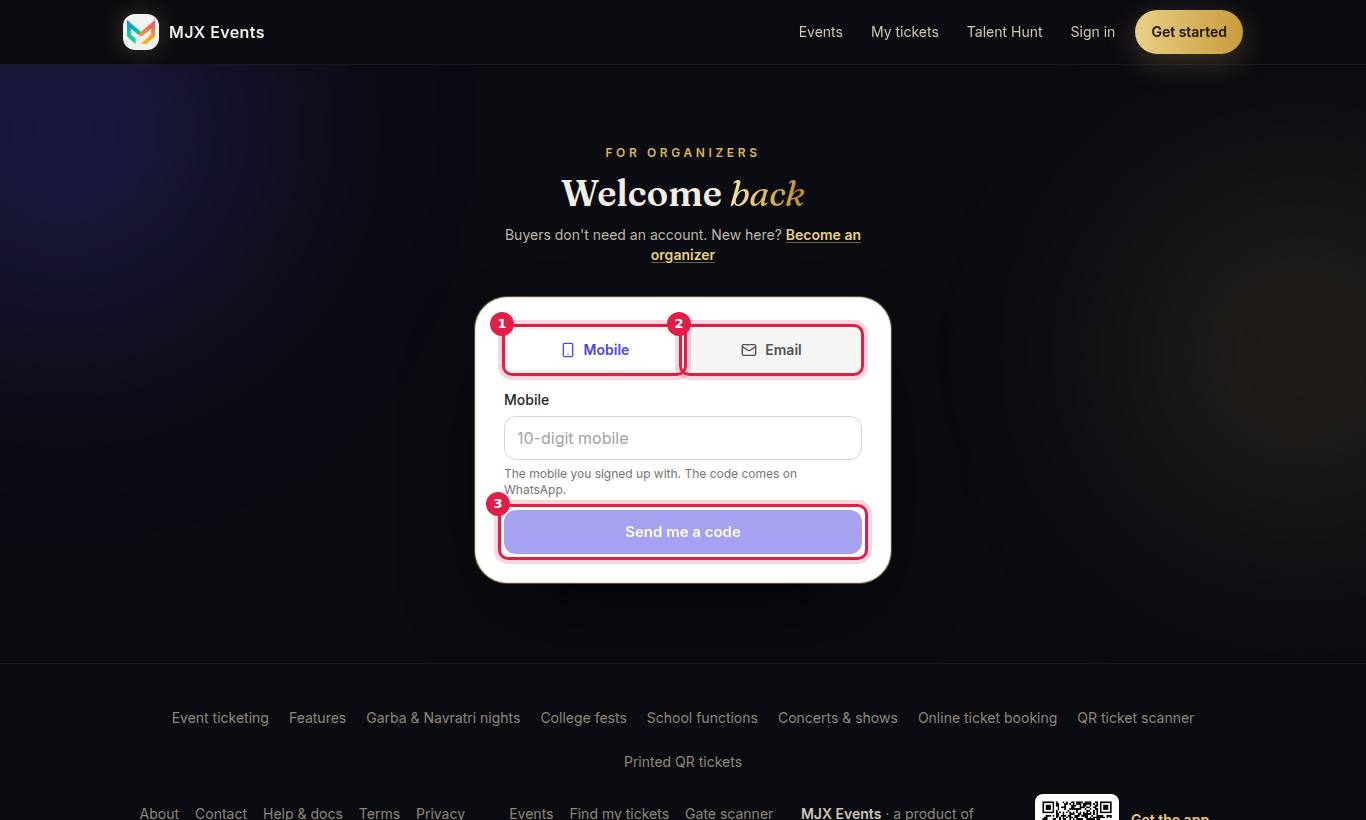
- Open Sign in. "For organizers. Buyers don't need an account."
- Choose Mobile ("The mobile you signed up with. The code comes on WhatsApp.") or Email ("The code comes to this email and on WhatsApp.").
- Tap Send me a code, type the code and sign in.
On some servers you may also see Continue with Google.
Team members sign in at ~/login?team=1. Sellers use ~/sell. Gate staff use the scanner PIN at ~/scan.
#Sign-in messages
| Message | What to do |
|---|---|
| "Wrong code. Check the email or WhatsApp and try again." | Type the newest code. |
| "That code has expired. Ask for a new one." | Codes last 10 minutes. |
| "That code was already used. Ask for a new one." | Request a new code. |
| "Too many tries. Please wait 15 minutes." | Wait, then try again. |
| "This account was deleted. To open it again, contact MJX support…" | Contact support. |
#Sign-up checks
To keep accounts real, sign-up refuses temporary email addresses ("Temporary emails can't be used.") and asks you to verify your mobile on WhatsApp: "Verify your mobile first: tap “Send code” and enter the code from WhatsApp." An email that already has an account is told: "This email already has an organizer account. Please sign in instead."
#Who can see what
| Person | Bank details | Plan & invoices | Team |
|---|---|---|---|
| Owner | Yes | Yes | Yes |
| Manager | No | No | No |
| Staff | No | No | No |
See User types.
#Delete my account (app)
In the MJX Events app: menu → Delete my account (owner only).
- Read what is removed and what is kept.
- Type DELETE to confirm ("Type DELETE to confirm").
It removes your name, email, mobile, UPI ID and public page, closes your events, removes team members and switches sellers off. Sales, payout and GST records stay, as the law requires. It is refused while an upcoming event has sold tickets. The same email can open a new account later.
#Privacy and location
The app may ask for your location at sign-in, a seller's sale and the gate. It is never required except when you make gate location Mandatory for your gate staff. See the Privacy Policy.
#Questions people ask
I don't get the sign-in code. What can I do?
Check WhatsApp and your email (including spam). Codes work for 10 minutes. After too many tries, wait 15 minutes ("Too many tries. Please wait 15 minutes.").
How do I delete my account?
In the MJX Events app, open the menu → Delete my account, type DELETE and confirm. It is refused while an upcoming event has sold tickets.