
Set up a talent hunt — name, season, rounds and talents
Create a talent hunt in MJX Events, set its web address and season, the number of rounds, the last date and which talents the form offers.
A talent hunt in MJX Events has a name, a public web address (/s/your-show) and one or more seasons. Each season has its own registration form, rounds and winner.
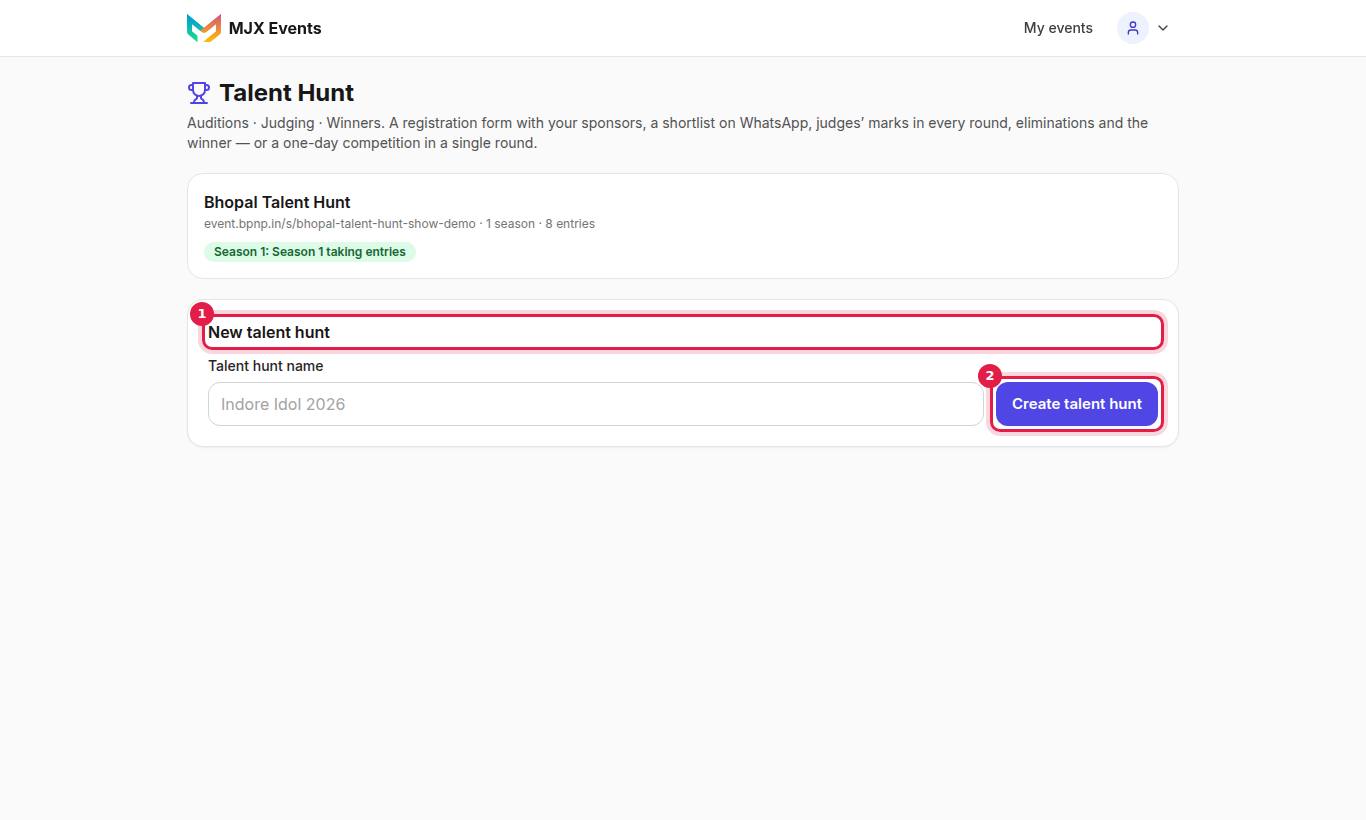
#How to create a talent hunt
- Open Talent Hunt and tap New talent hunt.
- Type the Talent hunt name (e.g. "Indore Idol 2026").
- Tap Create talent hunt.
"You can add seasons, judges and sponsors after." Each talent hunt has the tabs Entries, Rounds, Sponsors and Settings, a Public page link, and ← Talent Hunt to go back.
#Settings
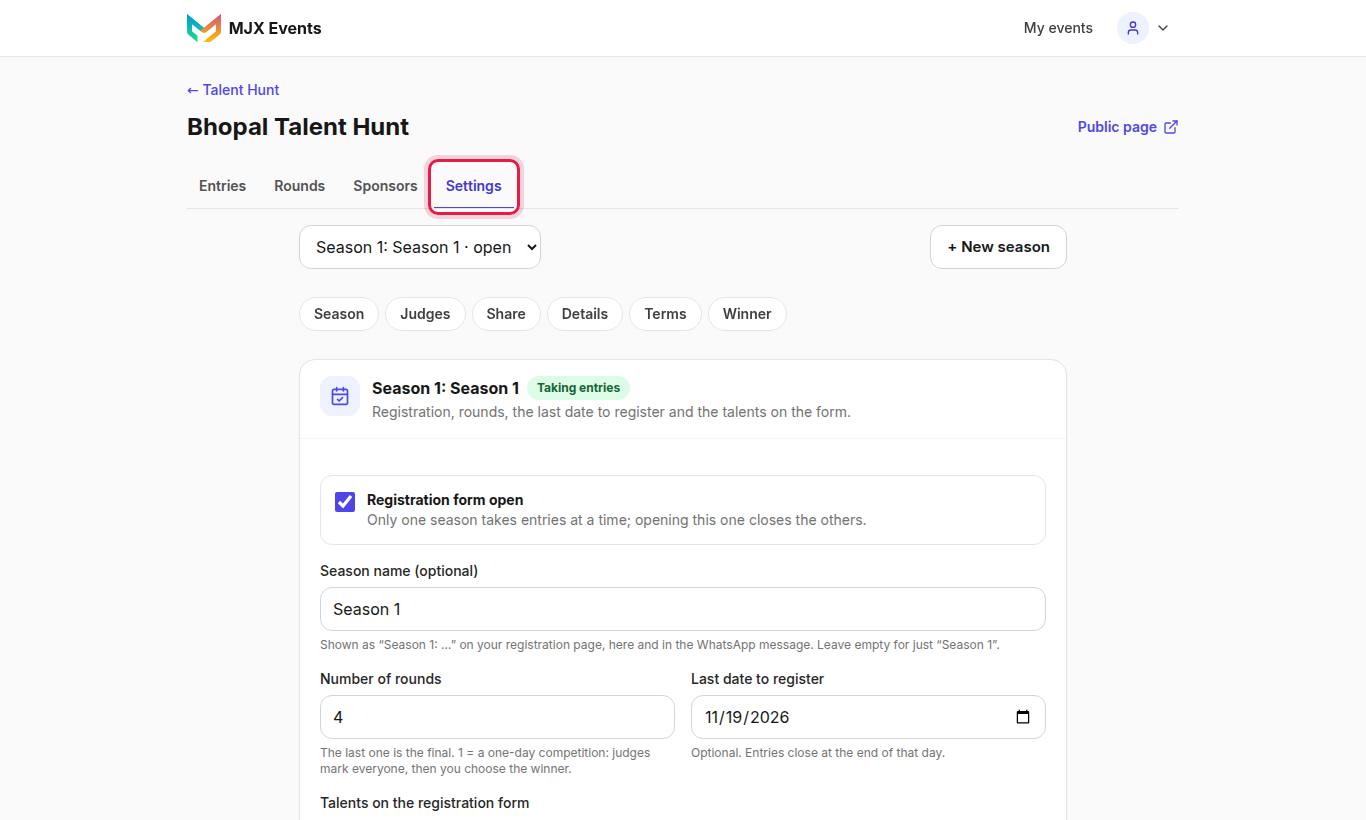
The settings sections are Season, Judges, Share, Details, Terms and Winner.
#Season
"Registration, rounds, the last date to register and the talents on the form."
| Field | What it does |
|---|---|
| Season name (optional) | e.g. "Talent Edition". "Shown as “Season 1: …” on your registration page, here and in the WhatsApp message." |
| Registration form open | Opens or closes this season's form. Only one season takes entries at a time. |
| Number of rounds | "The last one is the final. 1 = a one-day competition: judges mark everyone, then you choose the winner." |
| Last date to register | "Optional. Entries close at the end of that day." |
| Talents on the registration form | Tick the talents to offer, or All talents |
Tap Save season. For the next year, tap + New season.
The talents list: Singing / Music, Dance, Fashion show / Modelling, Comedy / Stand-up, Acting / Mimicry, Rap / Beatbox, Poetry / Shayari, Magic, Art / Painting, Fitness / Gymnastics / Martial arts, Anchoring / Public speaking, Sports / Cricket / Football, Other.
#Details
"What contestants see on the registration page."
| Field | Notes |
|---|---|
| Show name | The name on the page |
| Web address | "Changing it breaks links already shared." |
| Organisers' email | "Shown on the form: contestants write here to have their entry deleted or to ask a question." |
| Intro on the registration page | A short welcome |
Tap Save details.
#Terms
Each talent hunt has its own ready-made Contestant Terms, Judges' Terms and Privacy Notice. Fill in Organiser / owner (legal name), City for disputes and, if you like, Your own extra rules (optional), then Save terms. See Sponsors and terms.
#Judges, Share and Winner
- Judges — see Shortlist, judges and rounds.
- Share — see Registrations.
- Winner — the winner is chosen on the Rounds page. Here you can add their photo, a line about them, or type the winner of a season run before MJX Events, and tick Show this winner on the registration page.
#The public page
Your page at /s/your-show shows the registration form with Register now — it takes 2 minutes, your sponsors beside it (a "Your brand here" tile until you add one), Past winners, questions and answers, and a small MJX Events card. It never shows a list of contestants.
#Questions people ask
Can two seasons take entries at once?
No. "Only one season takes entries at a time; opening this one closes the others."
Can I change the web address later?
Yes, but "Changing it breaks links already shared."
Can a season be only for singers?
Yes. Under Talents on the registration form, tick just the talents you want. Contestants see only those.