
Partner API — run your guests and tickets from your own system
The MJX Events Partner API. Your own dashboard creates events and priced tickets, approves guests, sends tickets (paid to you, or with an MJX pay link) and gets webhooks for payments and check-ins.
Run everything from your own dashboard: MJX Events works in the background. Your system creates the event and its tickets (free or with a price), approves guests, and MJX sends each ticket on WhatsApp and email with its QR, in the event's ticket design. Webhooks tell your system what happened (paid, checked in, a new request). The gate scanner, Attendees and payouts work as for any MJX ticket.
#How it fits together
- Your dashboard creates the event and its tickets, approves guests and sends passes — each action is one API call. Requests guests make on MJX (event page, request page, your form's link) reach it too.
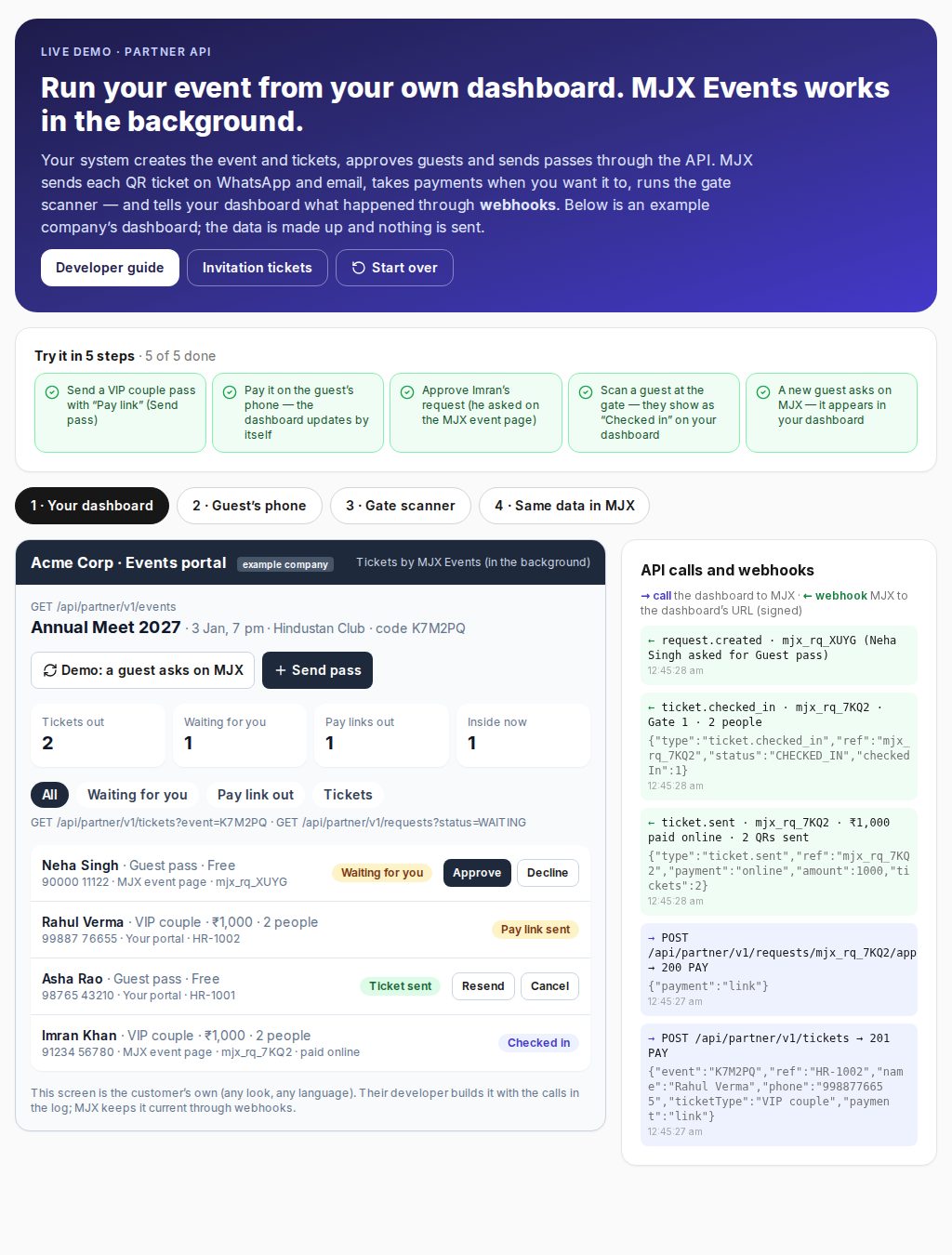
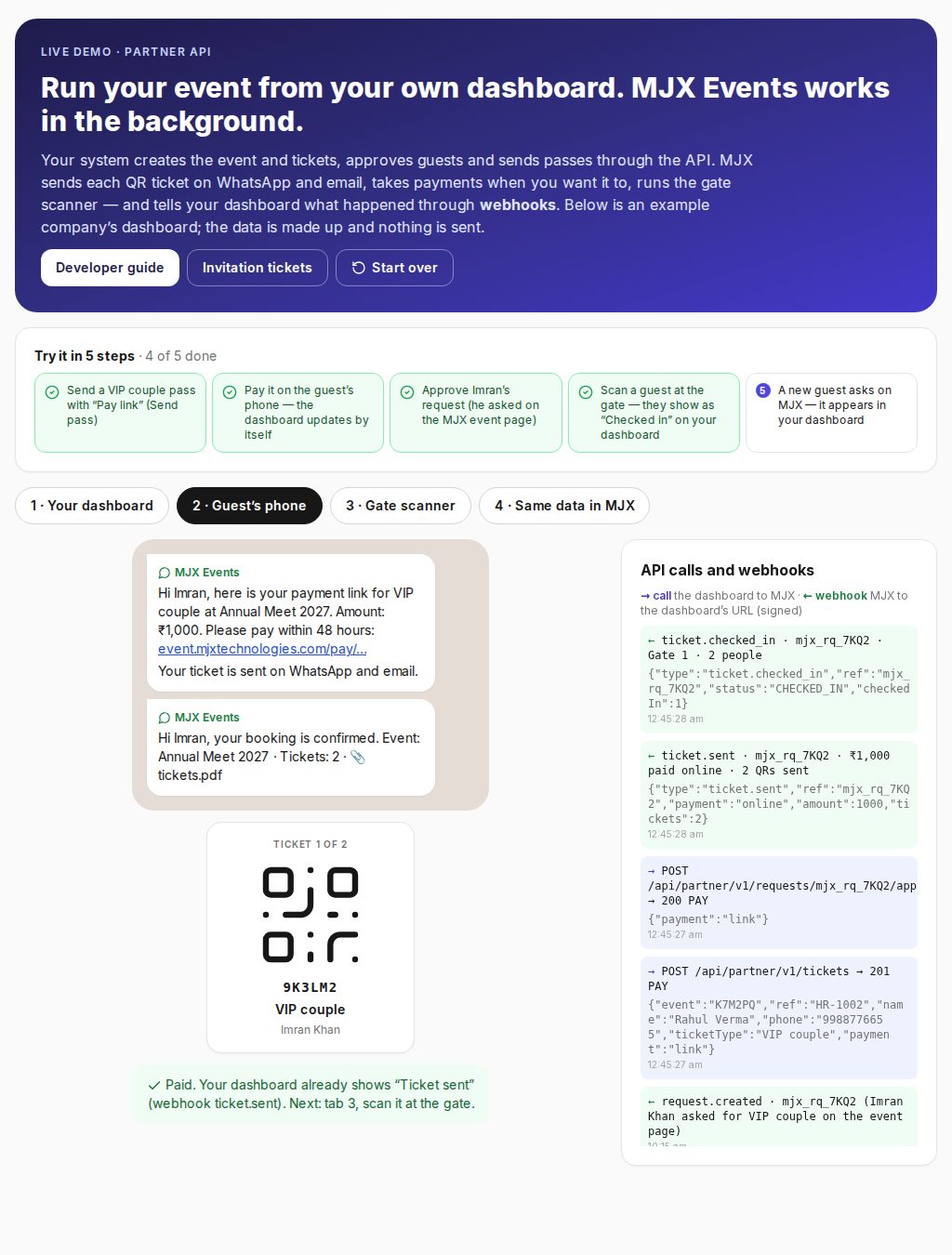
- The guest's phone gets the QR ticket on WhatsApp and email — or first a pay link, when MJX collects the money. Paying updates your dashboard by itself (webhook
ticket.sent).
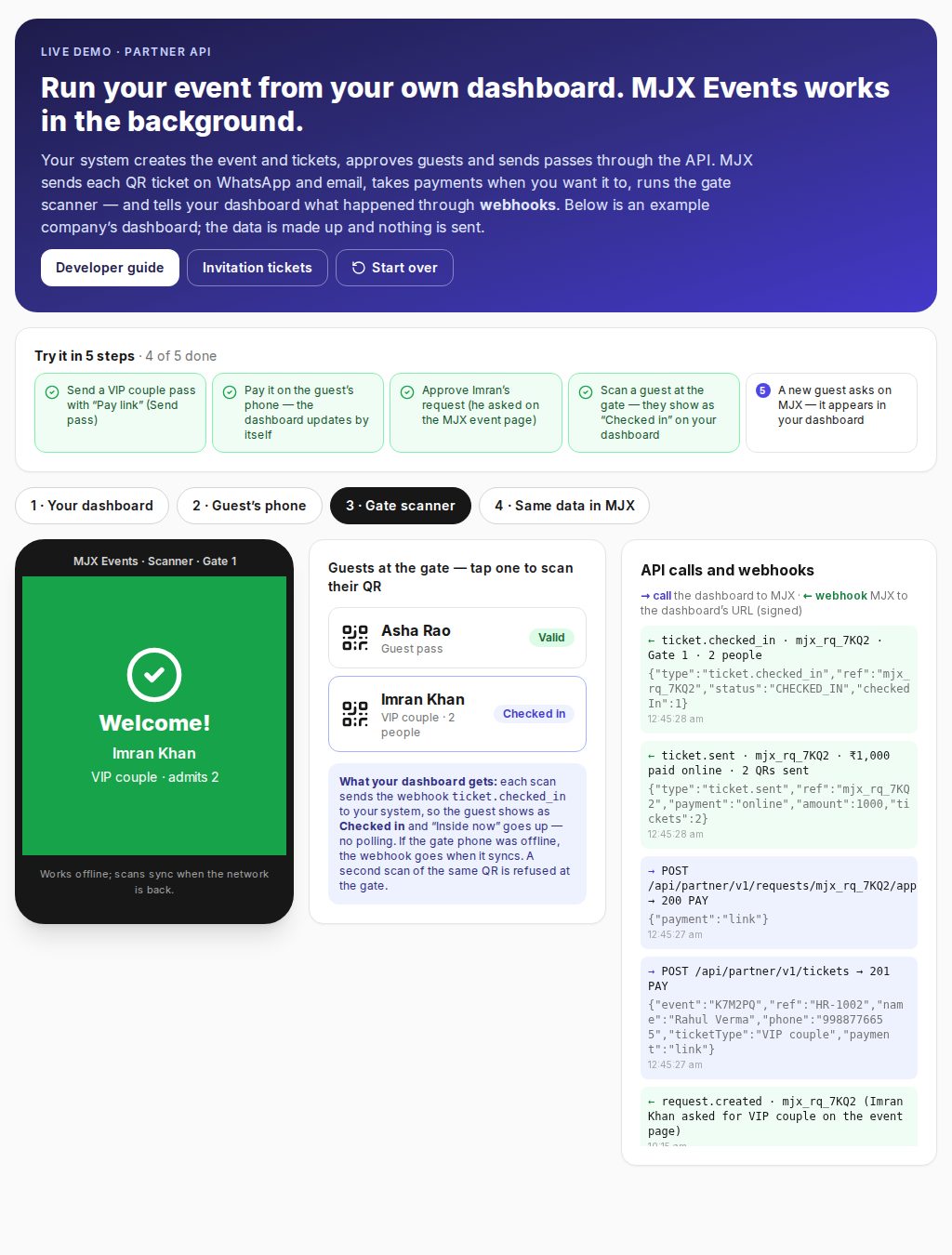
- At the gate your staff use the MJX Events scanner app. Each scan sends
ticket.checked_into your system, so the guest shows as checked in on your dashboard with no polling — even scans made offline, once the phone syncs.
Base URL: https://event.mjxtechnologies.com/api/partner/v1
#Before you start
- MJX switches the Partner API on for your account.
- On event.mjxtechnologies.com › account menu › Developers (API): make a key. It is shown once; keep it on your server only. A test key (
mjx_test_…) checks every call and answers, but makes and sends nothing. - Send the key in the
X-Api-Keyheader. Bodies and answers are JSON. Up to 120 calls a minute per key.
#Events: made on the website, or by your system
On the website: create and publish the event as usual (ticket design, venue, gate scanner). Its code (e.g. K7M2PQ) is under Developers.
By your system: POST /events makes a live event with a guests-only pass. Give it your own ref: the same ref again returns that event, never a second one.
POST /api/partner/v1/events
X-Api-Key: mjx_live_xxxxxxxx

{ "ref": "EVT-2027-ANNUAL", "name": "Annual Meet 2027",
  "startAt": "2027-01-03 19:00", "endAt": "2027-01-03 23:00",
  "venue": "Hindustan Club", "city": "Bhagalpur",
  "passes": 300, "maxPeople": 2 }

→ 201 { "event": { "code": "K7M2PQ", "ref": "EVT-2027-ANNUAL", "status": "LIVE",
                   "page": "https://event.mjxtechnologies.com/e/…",
                   "passes": { "name": "Guest pass", "total": 300, "left": 300 } } }
With your own ticket prices: send types instead of passes. Price is in rupees (0 = free); persons = how many people one ticket admits. Tickets made through the API are invitation tickets: requested and approved, never in the event page's cart. A price needs paid invitation tickets switched on for your account.
POST /api/partner/v1/events
X-Api-Key: mjx_live_xxxxxxxx

{ "ref": "EVT-2027-GALA", "name": "Annual Gala 2027", "startAt": "2027-01-03 19:00", "venue": "Hindustan Club", "city": "Bhagalpur",
  "types": [ { "name": "Guest pass", "price": 0, "quantity": 300 },
             { "name": "VIP couple", "price": 1000, "quantity": 40, "persons": 2, "description": "Front rows, dinner" } ] }

→ 201 { "event": { "code": "K7M2PQ", …, "types": [ { "id": "…", "name": "Guest pass", "price": 0, "quantity": 300, "left": 300, "persons": 1 },
                                                  { "id": "…", "name": "VIP couple", "price": 1000, "quantity": 40, "left": 40, "persons": 2 } ] } }
Add a ticket later: POST /events/K7M2PQ/types with { "name": "Staff", "price": 0, "quantity": 20 }.
Times without a zone are India time; ISO dates with a zone work too. GET /events lists your events with codes, their tickets (types) and the free pass a call gets when it names no ticket (passes). The ticket design, the gate scanner PIN and the rest are set on the website.
#Send a guest's pass (the main call)
POST /api/partner/v1/tickets
X-Api-Key: mjx_live_xxxxxxxx

{ "event": "K7M2PQ",
  "ref": "REQ-20417",
  "name": "Asha Rao",
  "phone": "9876543210",
  "email": "asha.rao@gmail.com",
  "address": "Naya Bazar, Bhagalpur",
  "people": 2 }

→ 201 { "ticket": { "ref": "REQ-20417", "status": "SENT", "people": 2,
                    "event": { "code": "K7M2PQ", "name": "Annual Meet 2027" },
                    "tickets": [ { "code": "8F2KQ7", "status": "VALID" }, { "code": "R4T8WX", "status": "VALID" } ],
                    "sentTo": { "whatsapp": true, "email": true },
"link": "https://event.mjxtechnologies.com/orders/…", "pdf": "…" } }refis your own id for the guest. Sending the same ref again returns the pass made before (200), so retries never make two.phoneoremailis needed (both is best). Each person gets their own QR.eventcan also be the event's details instead of a code:{ "ref": "EVT-2027-ANNUAL", "name": "…", "startAt": "…", "venue": "…", "city": "…", "passes": 300 }. MJX finds the event by your ref, or makes it the first time.- Without
ticketType, the pass is the event's free invitation ticket (the oneGET /eventsshows underpasses). An event whose invitation tickets all have a price answers 409: add a free one on the website, or name a free ticket type. - Optional:
ticketType(the ticket's name),extra(your own fields, kept with the guest).
#Tickets with a price: payment
A ticket with a price needs payment:
payment | Use it when | What happens |
|---|---|---|
"paid" | The guest already paid you (your own form or gateway, cash, UPI) | The ticket is sent at once — no MJX link. Recorded at the ticket's price as paid to you outside MJX: not in MJX payouts, shown under Insights. MJX's free-ticket fee applies per ticket (from your free-ticket credits; with none, the call answers 402). |
"link" | MJX should collect | The guest gets a pay link on WhatsApp and email (valid 48 hours); the ticket comes when they pay. Status PAY with payUrl and payBy; then SENT, or EXPIRED if not paid. Paid out like any online sale. |
{ "event": "K7M2PQ", "ref": "REQ-20418", "name": "Rahul Verma", "phone": "9988776655",
  "ticketType": "VIP couple", "payment": "paid" }
The guest's ticket shows the ticket's name (e.g. "VIP couple") — never "Free", never a price.
#Status, lists, resend, cancel
GET  /api/partner/v1/tickets/REQ-20417          → { "ticket": { "status": …, "payment": "free" | "paid" | "online" | "link", "amount": 1000, "tickets": [ … ], … } }
GET  /api/partner/v1/tickets?event=K7M2PQ&status=SENT&page=1   → { "total": 42, "page": 1, "pages": 1, "tickets": [ … ] }
POST /api/partner/v1/tickets/REQ-20417/resend   → the tickets again on WhatsApp and email (3 an hour)
POST /api/partner/v1/tickets/REQ-20417/cancel   → the QR stops working at the gate; the place goes back to the event
Statuses: WAITING (for approval) · PAY (pay link out) · SENT · CHECKED_IN · DECLINED · EXPIRED (pay link not paid in time) · CANCELLED.
#Requests from MJX (event page, request page, your form's link)
Guests can also ask on MJX: the event page's Request button, MJX's request page, or a form that posts to the event's request link. Approve them from your dashboard:
GET  /api/partner/v1/requests?event=K7M2PQ                  → { "requests": [ { "id": "cm…", "name": "Imran Khan", "status": "WAITING", "ticketType": { "name": "VIP couple", "price": 1000 }, … } ] }
POST /api/partner/v1/requests/cm…/approve   { "payment": "paid" }   → ticket sent (free tickets need no body)
POST /api/partner/v1/requests/cm…/approve   { "payment": "link" }   → pay link sent
POST /api/partner/v1/requests/cm…/decline                   → the guest is told; one paid through MJX first is refunded in full
They also show under the event's Requests on event.mjxtechnologies.com and in the app, with the same choice: Approve · pay link or Approve · paid to you.
#Webhooks
Under Developers (API), open Webhook on a key and add your address (https). MJX then calls it with JSON for each of these, with the same ticket body as the API:
type | When |
|---|---|
request.created | A guest asked on MJX (event page, request page, your form's link) |
payment.link_sent | A pay link went out |
ticket.sent | A ticket was sent (approved, paid to you, or the guest paid the link) |
payment.expired | A pay link ran out; the place is free again |
ticket.checked_in | Scanned in at the gate |
ticket.cancelled | Cancelled through the API |
request.declined | Declined |
{ "id": "cm…", "type": "ticket.sent", "createdAt": "2027-01-02T10:15:00.000Z",
  "data": { "ticket": { "id": "cm…", "ref": "REQ-20418", "status": "SENT", "payment": "online", "amount": 1000, … } } }
Every call carries X-MJX-Event, X-MJX-Delivery, X-MJX-Timestamp and X-MJX-Signature: sha256=… — an HMAC-SHA256 of "<timestamp>.<body>" with the key's webhook secret. Check it, then answer 2xx within 10 seconds. Not answered: MJX tries again after 1 minute, 5 minutes, 30 minutes, 2 hours, 6 hours and 24 hours. Send a test on the Developers page sends a ping.
// Node.js (Express): check the signature
const crypto = require("crypto");
app.post("/mjx-webhook", express.raw({ type: "application/json" }), (req, res) => {
  const ts = req.get("X-MJX-Timestamp");
  const want = "sha256=" + crypto.createHmac("sha256", process.env.MJX_WEBHOOK_SECRET).update(`${ts}.${req.body}`).digest("hex");
  if (req.get("X-MJX-Signature") !== want) return res.sendStatus(401);
  const { type, data } = JSON.parse(req.body);
  // update your dashboard with data.ticket …
  res.sendStatus(200);
});#Examples
#curl (quick test)
Under Developers (API) these are ready to copy, with your key and an event code filled in. With a test key nothing is made or sent.
# Check the key: your events and their codes
curl https://event.mjxtechnologies.com/api/partner/v1/events \
  -H "X-Api-Key: YOUR_KEY"

# Send a guest's pass
curl -X POST https://event.mjxtechnologies.com/api/partner/v1/tickets \
  -H "X-Api-Key: YOUR_KEY" \
  -H "Content-Type: application/json" \
  -d '{"event":"K7M2PQ","ref":"test-1","name":"Test Guest","email":"you@example.com"}'

# Its status (after a live key sent it; a test key makes nothing to look up)
curl https://event.mjxtechnologies.com/api/partner/v1/tickets/test-1 \
-H "X-Api-Key: YOUR_KEY"#PHP
$ch = curl_init("https://event.mjxtechnologies.com/api/partner/v1/tickets");
curl_setopt_array($ch, [
  CURLOPT_POST => true, CURLOPT_RETURNTRANSFER => true,
  CURLOPT_HTTPHEADER => ["X-Api-Key: " . getenv("MJX_KEY"), "Content-Type: application/json"],
  CURLOPT_POSTFIELDS => json_encode(["event" => "K7M2PQ", "ref" => $req->id, "name" => $req->name,
                                     "phone" => $req->phone, "email" => $req->email, "people" => 2]),
]);
$res = json_decode(curl_exec($ch), true);#Node.js
const res = await fetch("https://event.mjxtechnologies.com/api/partner/v1/tickets", {
  method: "POST",
  headers: { "X-Api-Key": process.env.MJX_KEY, "Content-Type": "application/json" },
  body: JSON.stringify({ event: "K7M2PQ", ref: req.id, name: req.name, phone: req.phone, email: req.email, people: 2 }),
});
const { ticket, error } = await res.json();#Python
import os, requests
r = requests.post("https://event.mjxtechnologies.com/api/partner/v1/tickets", headers={"X-Api-Key": os.environ["MJX_KEY"]},
    json={"event": "K7M2PQ", "ref": req.id, "name": req.name, "phone": req.phone, "email": req.email, "people": 2})
ticket = r.json()["ticket"]#Answers
| Code | Meaning |
|---|---|
| 201 | Made (and sent) |
| 200 | The same ref again: what was made before |
| 401 | Key missing, wrong or revoked |
| 403 | The Partner API (or, for a price, paid invitation tickets) is not switched on for the account |
| 402 | Not enough free-ticket credits for MJX's fee on a ticket paid to you: buy credits, then send the same ref again |
| 404 | No such event or ref on your account |
| 409 | No passes left, or the event is not live |
| 422 | A field is missing or wrong: the error says which |
| 429 | Too many calls: wait a minute |
| 500 | Our side: try again with the same ref |
Every error is { "error": "…" } in plain words.
#Related
- Live demo — an example company's dashboard running on this API
- Invitation tickets — guests who request through your event page or your own form instead
#Questions people ask
How do I get an API key?
MJX switches the Partner API on for your account. Then on event.mjxtechnologies.com open the account menu › Developers (API) and make a key. It is shown once.
Can I test without sending real passes?
Yes. A test key (mjx_test_…) checks every call and answers like a live key, but makes and sends nothing.
What if my call times out and I send it again?
Send the same ref. MJX returns the pass made the first time (200), so retries never make two.
Can the API issue paid tickets?
Yes, with paid invitation tickets switched on for your account. Send "payment": "paid" when the guest already paid you (the ticket goes at once, no MJX link), or "link" for MJX to send a pay link.
How does my system know a guest paid or was checked in?
Add a webhook address under Developers (API). MJX calls it, signed, for new requests, pay links, payments, expired links, check-ins, cancellations and declines.