
Ticket types, prices, couple and family passes, day passes
Set up ticket types in MJX Events — prices, quantities, couple and family passes, day passes for multi-day events, offline-only types and early-bird prices.
A ticket type is one kind of ticket with its own price and number of seats — for example Stag, Couple, Family or VIP. In MJX Events every online ticket, printed ticket and counter sale uses these same types and seats.
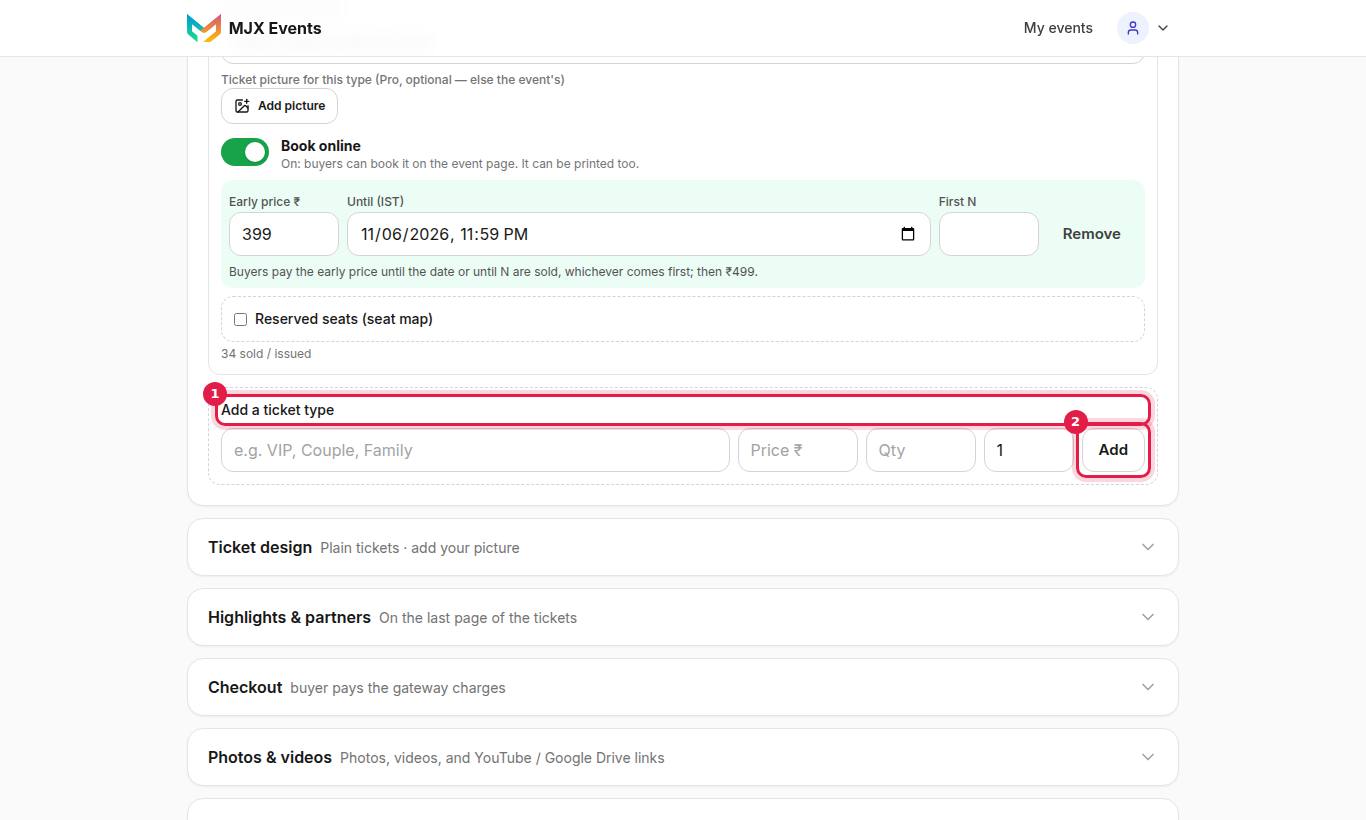
#How to add a ticket type
- Open Tickets in Setup.
- Under Add a ticket type, fill in Name (for example "VIP, Couple, Family"), Price ₹ (0 = free), Quantity and People.
- Tap Add.
You can change the name, price and quantity of a type later; changes save by themselves.
#Settings for each ticket type
| Setting | What it does |
|---|---|
| Name | What buyers see, e.g. "Stag", "Family" |
| Price ₹ (0 = free) | 0 makes a free ticket |
| Quantity | How many seats of this type exist |
| People per ticket | "How many people one ticket admits: 1, 2 for a couple, 4 or 5 for a family" (up to 50) |
| Description (optional) | One line under the name, e.g. "For children aged 5–12. Bring age proof." |
| Book online | "On: buyers can book it on the event page. It can be printed too." "Off: shown on the event page with its price, sold only as printed tickets or at the counter." (Shown when the event sells both online and offline.) |
| Invitation only | Guests can't book it: they tap Request and you approve each one (an add-on MJX switches on). See Invitation tickets. |
| Valid on | Multi-day events only — "Any one day" or ticked days |
| + Early-bird price | Pro — a lower price for a while |
| Ticket picture for this type | Pro (Design per ticket type) — its own picture on the ticket |
| Reserved seats (seat map) | Only when seat maps are on — see Seat maps |
#Couple, family and group tickets
- Online: one Family ticket for 4 becomes 4 QRs in the same order. The buyer forwards each person their QR; people can arrive separately.
- Printed: one paper with a head count. At the gate the scanner asks how many are entering now, and counts them.
- Price and seats stay per ticket, not per person.
- "Checked in" counts people, not tickets.
#Day passes for multi-day events
When the event's start and end fall on 2 or more days, each type shows Valid on:
- Any one day (the default) — "One entry, on any day of the event."
- Tick days — "Tick days to make it a day pass." It then gets in once on each ticked day with the same QR.
Example: Day 1 ₹499 (13 Oct), Day 2 ₹499 (14 Oct), and a 2-Day pass ₹899 with both days ticked. When a several-day pass is cheaper than the separate days, buyers see a green "Save ₹…".
#Date-wise pricing: weekend, per day, or per date
When the price depends on which day the buyer visits — a water park that charges more on weekends, or a festival with a different price each night — use date-wise pricing.
First tell MJX the event has visit dates:
- A daily attraction (water park, museum, resort): in Setup → Basics turn on Open every day (attraction). Buyers then pick a visit date, and you set the daily Opens and Closes times shown on the event page.
- A multi-day event: set the Ends date a day or more after Starts.
Then, on a ticket type, turn on Price changes by date:
| Event | Choices |
|---|---|
| Open-every-day attraction | Weekday / weekend — the Price field is the Mon–Fri price; set a Sat–Sun price and choose whether holidays count as weekend. Or Price per day — a price for each day of the week. |
| Multi-day event | A price per date — a price for each event date. |
A day or date left blank uses the Price above it. The buyer sees the right price for the date they pick, and the event page shows a "from ₹…" starting price.
#Early-bird price (Pro)
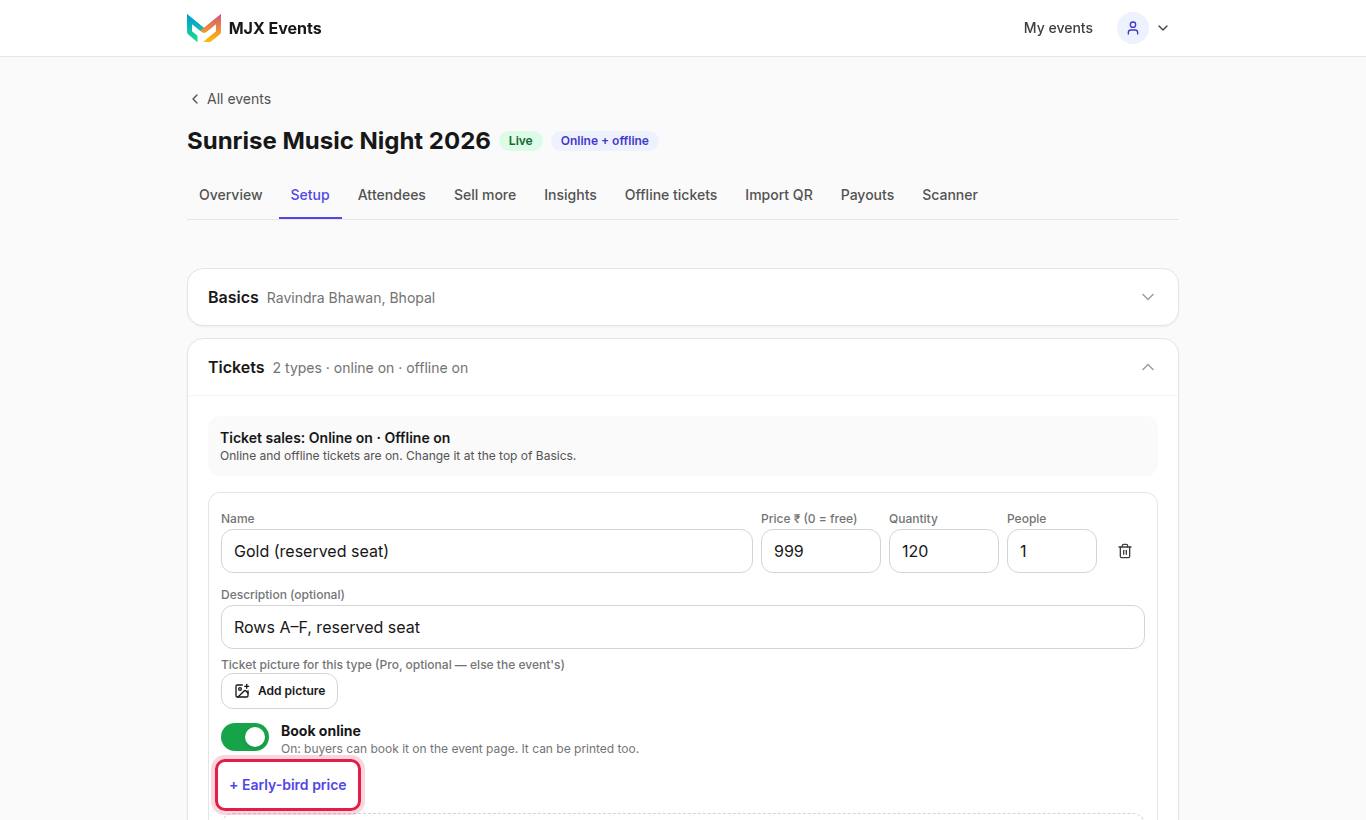
- Under a paid ticket type tap + Early-bird price.
- Fill in Early price ₹, and Until (IST) and/or First N.
The early price ends at the date or after the first N tickets, whichever comes first. The event page shows an Early bird badge with the saving and "Offer ends …" or "N left at this price".
#Rules to know
- Up to 10 tickets of one type per order.
- An unpaid online order holds its seats for 15 minutes.
- Printed tickets use real seats; imported tickets do not.
- On the Free plan the total seats of all types (plus imported codes) is capped. Setup says, for example, "The Free plan allows up to 100 tickets per event. Upgrade to Plus (Plan) for more tickets."
- Cancelling a ticket frees its seat.
#Questions people ask
How do I sell a couple pass?
Add a ticket type such as "Couple" and set People per ticket to 2. Online, the buyer gets one QR per person; a printed couple pass is one paper that admits two.
Can I change "people per ticket" later?
Not once tickets of that type exist. Add a new ticket type instead.
How do day passes work?
On an event that runs over 2 or more days, tick the days under Valid on. The pass gets in once on each ticked day with the same QR.
Is early-bird pricing on every plan?
Early-bird prices are a Pro tool by default. Your Plan page shows what your plan includes.
How do I charge more on weekends?
In Setup → Basics turn on Open every day (attraction) (and set the daily Opens/Closes times). Then on the ticket type turn on Price changes by date → Weekday / weekend and set the Sat–Sun price — the Price field stays the Mon–Fri price. You can also set Price per day (a price for each day of the week), or, on a multi-day event, a price per date.