
Sellers — shops, agents and volunteers who sell your tickets
Add sellers in MJX Events, give them batches of printed tickets, let venue staff sell any pass, see what each one sold and collect the money.
A seller is a shop, agent or volunteer who sells your printed tickets. In MJX Events each seller signs in to their own seller app, sees only the tickets you gave them, and records each sale — so you always know who sold what and how much they owe you.
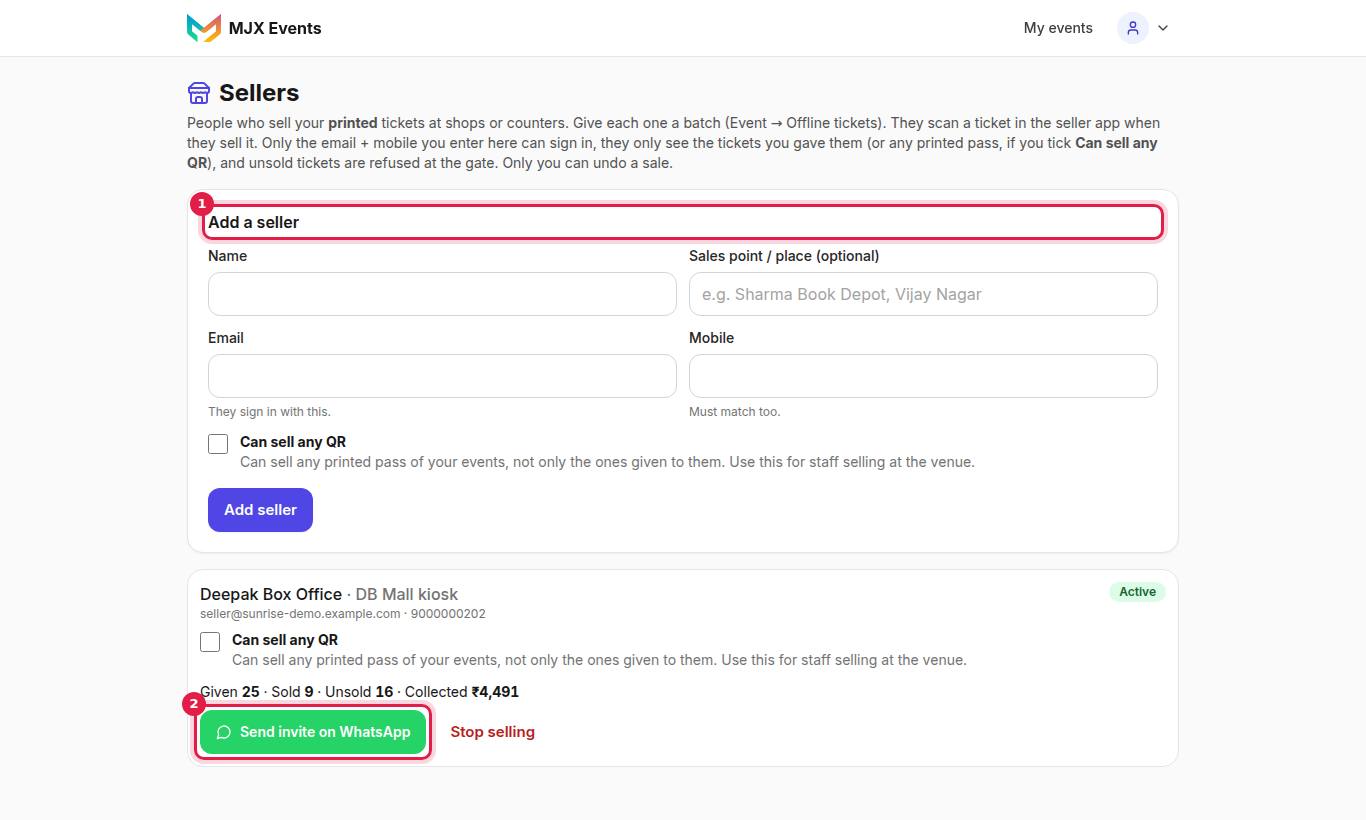
#How to add a seller
- Open Sellers and tap Add a seller.
- Fill in Name, Sales point / place (optional) (e.g. "Sharma Book Depot, Vijay Nagar"), Email ("They sign in with this.") and Mobile ("Must match too.").
- Save, then tap Send invite on WhatsApp to send them the seller link.
- Give them tickets: on the event's Offline tickets tab, print a batch and choose them under Who sells these? (one batch per shop).
#Can sell any QR
Tick Can sell any QR for staff who sell at the venue from one mixed pile: "Can sell any printed pass of your events, not only the ones given to them. Use this for staff selling at the venue."
Under it choose Any event of mine or Only these events and tick the events. Online tickets can never be sold this way.
#What each seller card shows
Given · Sold · Unsold · Collected — the tickets you gave them and the money they recorded.
#Collecting the money
Counter money never passes through MJX, so there is no MJX fee. On the event's Payouts tab, To collect from sellers lists each Seller with Sold and To collect. "Collect each seller's amount from them."
#How to stop a seller
Stop them on the Sellers page: "Stop [name] from selling? They lose access right away. Tickets they already sold stay valid." A seller with tickets or sales can't be deleted — "deactivate them instead, so the record stays."
#Rules that protect you
- A printed ticket given to a seller is refused at the gate (NOT SOLD) until it is sold.
- Sellers can mark their own passes sold, but can't undo a sale: "Only the organizer can undo a sale. Ask them to mark this ticket as unsold."
- Two phones can't sell the same ticket.
- If you switch the event to online only, sellers see "The organizer sells this event online only now. Ask them before selling."
#Questions people ask
Do sellers need to download an app?
No. They use the seller page at event.mjxtechnologies.com/sell on any phone, or the MJX Events app's Seller role.
Can a seller cancel a sale they made by mistake?
No. Only you can undo a sale, from Attendees → Edit sale → Mark as unsold.
What happens when I stop a seller?
They lose access right away. Tickets they already sold stay valid.